


FreshBooks Invoicing App
4.11.43K Reviews
App Specs
- Version
- 1.24.48
- Updated On
- License
- Free
- Downloads
- 1,000,000+
- Developer
- FreshBooks Cloud Accounting
- Categories
- Business
- Platform
- Android
Screenshots
 Analysis by AppCompare
When I choose an invoicing app, I care less about a long feature list than about whether I can finish the work between client conversations: record what I did, send a clear bill, and keep track of what still needs attention. FreshBooks is aimed at that practical small-business routine. It is a business app from FreshBooks Cloud Accounting, and its mix of invoicing and expense tracking makes the most sense for people who want those tasks close at hand rather than spread across several tools.
The app is free to download, but that does not mean every part of using it is free: in-app purchases range from $21 to $65 per item. I’d treat the download as a chance to see whether the workflow suits you, then check the available plan and purchase details before relying on it for ongoing business operations. That distinction matters if you are comparing it with a basic invoice template or a tool you already have through another service.
Who benefits from keeping the workflow together
I can see FreshBooks fitting a freelance designer, consultant, repair professional, or other independent worker who bills clients directly and wants to keep receipts and time records from drifting into separate notebooks. Its 4.3 average from around 6,000 ratings, alongside over 500,000 installs, suggests that plenty of people have tried it, though popularity alone should not decide whether it matches your way of working. It is rated for Everyone, and the current version is 1.24.40, with Android 8.0 or later required.
A useful everyday routine would be to finish a client call, note the time while the details are still fresh, and later turn the recorded work into a bill instead of reconstructing it at the end of the month. For an out-of-office expense, taking a receipt photo and logging it promptly can also prevent the familiar shoebox problem. These habits are small, but they reduce the mental load of remembering what happened and when.
Small workflow choices that make a difference
For hourly work, I would make a habit of recording time against the right client or task as soon as possible. The real benefit is not merely having a timer; it is avoiding a vague end-of-week estimate that can short-change you or make an invoice hard to explain. Before sending a bill, I’d review the entries and remove anything that should not be charged. That quick check helps keep convenience from turning into an accidental billing mistake.
Receipt capture works best as a routine, not a rescue mission. I’d photograph a receipt soon after paying, then add enough context to recognize the purchase later. A photo without a useful note can still leave you guessing when you review expenses. Keeping those records current makes it easier to spot missing documentation before bookkeeping becomes urgent, although it does not replace checking that each expense is categorized appropriately for your own records.
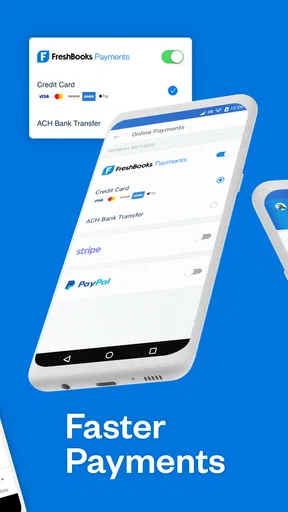
Online payment options can make an invoice easier for a client to settle, but payment convenience is only one part of cash flow. I would still check which invoices remain outstanding and follow up politely when needed. Sending a bill through the app does not guarantee that a client pays on time, and a payment method that suits one customer may not suit another. The useful trade-off is less friction at the point of payment, not a substitute for clear terms or follow-up.
Worth Reading Before You Choose

Flipboard Shows What News Apps Must Do Beyond the Feed

Switching to Android Auto Means Rethinking Your Driving Routine

Google Calendar Makes a Crowded Week Easier to Manage

Ludo King Makes the Most of the Minutes Between Plans

Baby Panda World Brings Quick Play to Modern Phones, but Its Game Library Feels Busy

ESPN’s Live Game View Makes Following Close Games Easier
Getting Started with FreshBooks
First things first, setting up the FreshBooks app was a breeze. I downloaded it from the App Store (it's available on both iOS and Android), and within minutes, I was ready to roll. The interface is sleek and intuitive, which is a huge plus if you're not a tech whiz. I appreciated how the app guides you through the initial setup, making it easy to input your business details.
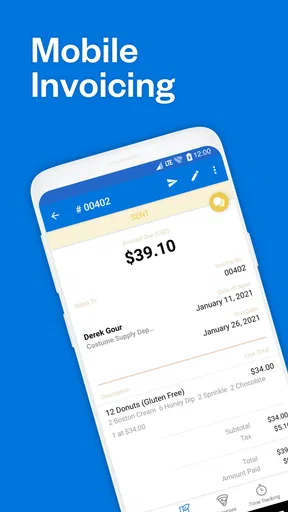
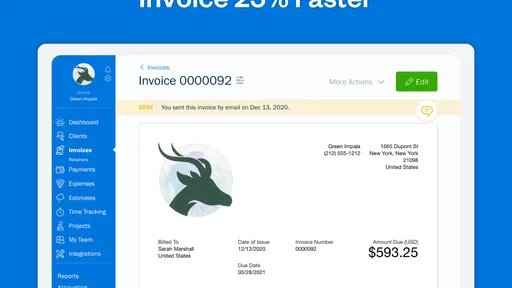
Once you're in, creating invoices is super straightforward. You can customize them with your logo, business name, and even choose from a variety of templates. I found this really handy because it allowed me to maintain a professional look without spending hours designing.
Features That Stand Out
FreshBooks isn't just about invoicing; it’s packed with features that make managing your finances a breeze. One of the standout features for me is the time-tracking tool. If you bill clients by the hour, this feature is a lifesaver. You can track time directly in the app and then easily convert those hours into an invoice.
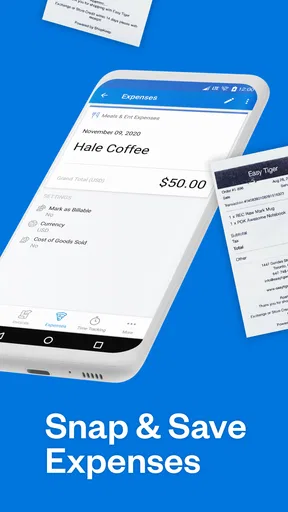
The app also offers expense tracking, which is perfect for keeping tabs on where your money is going. You can snap photos of receipts and log expenses on the go. This has made my bookkeeping a lot less chaotic, and I no longer have a pile of paper receipts cluttering my desk.
Another cool feature is the ability to accept online payments. FreshBooks integrates with several payment gateways, so clients can pay directly through the invoice. This feature has significantly reduced my payment waiting time, making cash flow management a lot smoother.
User Experience
Now, let’s talk about the overall user experience. The app runs smoothly, and I haven’t encountered any glitches or crashes, which is always a win. Plus, the design is clean and easy on the eyes. The developers clearly put a lot of thought into ensuring that everything is accessible and easy to find.
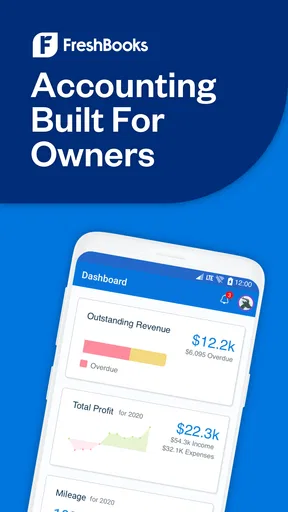
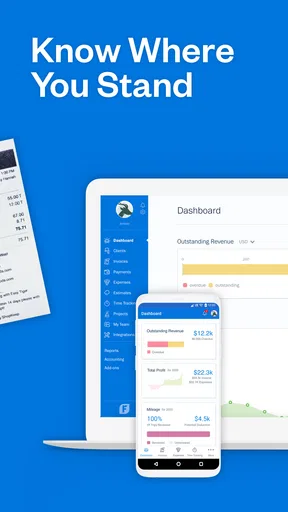
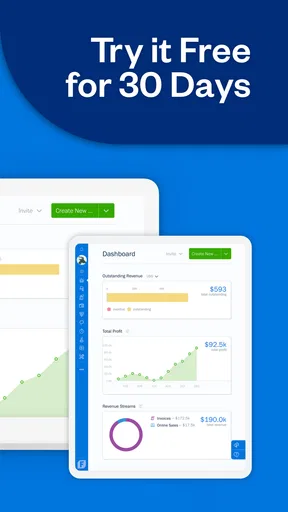
One thing I love is the dashboard. It gives you a snapshot of your financial health with charts and graphs that are easy to understand. You can see outstanding invoices, total profit, and expenses at a glance. It’s like having a personal accountant right in your pocket.
Customer Support
In terms of support, FreshBooks has a solid reputation. They offer customer service via phone, email, and live chat. I tested out their chat support and got a quick, helpful response, which was reassuring. It’s great to know that backup is there if you hit any snags.
Final Thoughts
Overall, I’m pretty impressed with the FreshBooks Invoicing App. It offers a comprehensive suite of tools that streamline the financial side of running a business. While there are plenty of invoicing apps out there, FreshBooks stands out because of its ease of use and robust feature set.
If you’re a freelancer, small business owner, or just someone who needs to keep their finances in check without a lot of fuss, I’d say give FreshBooks a try. It’s definitely made my life a bit easier, and I’m sure it could do the same for you.
When a different kind of tool is the better fit
The main choice is whether you want an invoicing app to be the center of your bookkeeping, or just a quick way to send a bill. Compared with a spreadsheet or a document template, FreshBooks connects invoicing with time and expense records, which can reduce copying details from one place to another. A plain template may be easier if you send only occasional invoices and already have a dependable way to track payments. The trade-off is that you will need to maintain those records yourself.
Compared with broader accounting software, FreshBooks feels most appealing when client billing is a regular part of the workday and you value a mobile-first routine. A more comprehensive accounting setup may suit a business with complex reporting needs, multiple people handling finances, or established processes that already depend on other systems. I would not switch solely for a polished invoice screen; first map how you handle records from purchase to reconciliation and make sure the app fits the whole process you actually need.
It is also worth separating a solo operator’s needs from those of a growing team. If several people need to approve expenses, manage different responsibilities, or follow formal bookkeeping procedures, a dedicated accounting platform may be a better base. FreshBooks can still be useful for the person preparing client invoices, but adding it without deciding which system is the source of truth can create duplicate records and extra cleanup.
Make the switch deliberately
Moving from another invoicing method is less about importing a logo and more about preserving context. Before changing tools, I would list active clients, unpaid invoices, recurring billing habits, and expenses that still need documentation. Then decide what must be carried over and what can remain in the old records for reference. Keeping the transition date clear helps avoid sending the same bill twice or overlooking an outstanding payment.
I would also test the entire path with a low-risk invoice: enter a client, prepare the bill, review how it looks, and confirm that the payment process makes sense from the customer’s side. Then check how you would record the payment and find the invoice again later. This reveals practical friction that a quick tour of the interface might miss. If your current system is reliable, move only when the time saved in the combined workflow outweighs the effort of changing habits.
For Android users, the minimum requirement is version 8.0, so I would check the operating system before planning a switch. The app is free to install, but its in-app purchases are priced from $21 to $65 per item; review the purchase options against your expected use before building your process around it. That is especially sensible for seasonal freelancers, whose need for invoicing may change over the year.
My recommendation
I would recommend FreshBooks to an independent professional who regularly bills clients, tracks time, and wants to capture expenses while away from a desk. Its strongest case is the connection between work records and the invoice, supported by a straightforward interface and a dashboard for checking what needs attention. It can make the routine feel more manageable, provided you keep entries accurate and still follow up on unpaid bills.
I would be more cautious if you need a full accounting system for a larger operation, have complicated approval or reporting requirements, or only send a bill now and then. In those cases, a broader platform or a simple existing method may create less disruption. My advice is to test one complete client-billing cycle before committing: record the work, prepare the invoice, consider how the client pays, and review the expense trail you need afterward. If that sequence feels natural and the purchase terms work for your budget, this is a practical tool to keep in your business routine.
Pros
- User-friendly interface simplifies invoicing.
- Powerful automation saves time on tasks.
- Customizable templates enhance branding.
- Multi-currency support for global business.
- Integrates well with payment gateways.
Cons
- Limited features in free trial version.
- Occasional sync issues with bank accounts.
- Mobile version lacks some desktop features.
- Pricing can be high for small businesses.
- Customer support response can be slow.
FAQs for FreshBooks Invoicing App
What features does FreshBooks offer for invoicing?
FreshBooks provides a comprehensive invoicing system that includes customizable invoice templates, automated billing, and recurring invoices. Users can also track invoice views, accept online payments, and send automatic payment reminders. Additionally, FreshBooks offers multi-currency invoicing, making it ideal for businesses with international clients.
Is FreshBooks suitable for small businesses and freelancers?
Yes, FreshBooks is specifically designed with small businesses and freelancers in mind. Its intuitive interface and powerful features, such as time tracking, expense management, and project management, cater to the needs of smaller operations. It offers scalability, allowing users to start small and expand their usage as their business grows.
How secure is my financial data with FreshBooks?
FreshBooks takes data security seriously and uses industry-standard security measures to protect user information. This includes 256-bit SSL encryption, routine security audits, and data backups. Additionally, FreshBooks complies with GDPR regulations, ensuring that your financial data remains private and secure.
Can FreshBooks integrate with other business tools I use?
Yes, FreshBooks offers a wide range of integrations with popular business tools such as PayPal, Stripe, G Suite, Slack, and more. These integrations help streamline your workflow by connecting FreshBooks with the tools you already use, enhancing productivity and efficiency in your business operations.
What support options are available if I encounter issues with FreshBooks?
FreshBooks provides a robust support system, including a comprehensive help center with guides and tutorials. Users can also reach out to customer support via email or phone for personalized assistance. The support team is known for being responsive and helpful, ensuring that any issues are resolved promptly.


